Wallet2QR
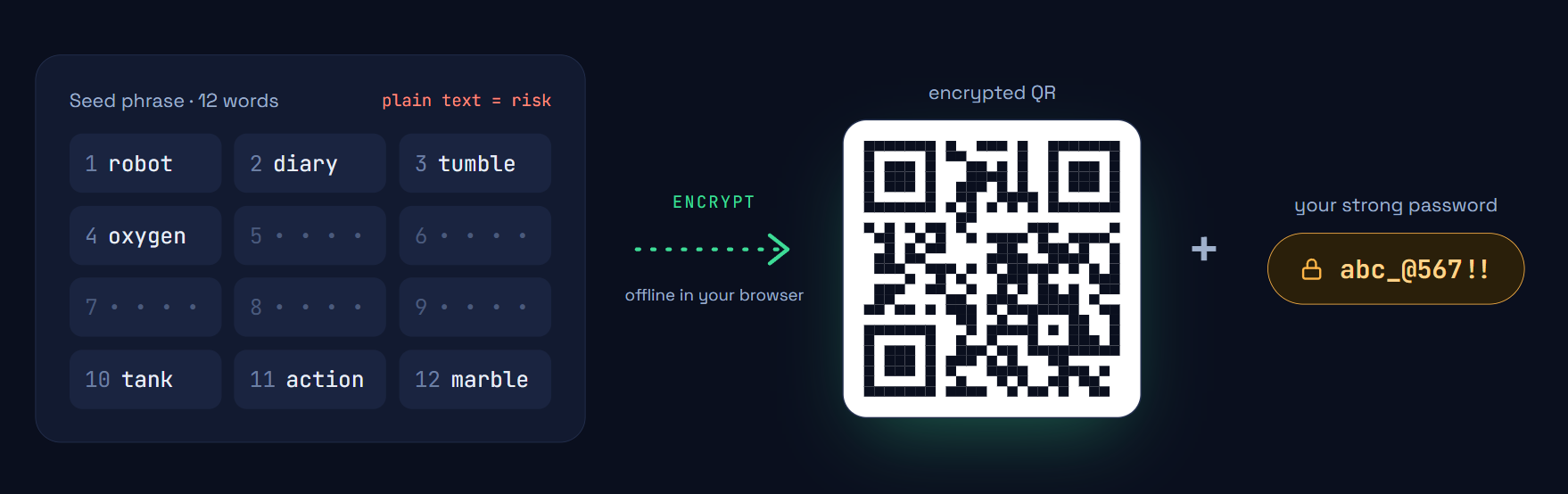
Your seed phrase, encrypted into a QR code that is impossible to crack
Every password — right or wrong — unlocks a real-looking wallet. Attackers who steal your QR get millions of plausible decoys with no way to find yours. Cold-wallet security, no hardware needed, works in any browser.
How it works
Enter a password, get an encrypted QR code. Honey encryption means every password — right or wrong — unlocks a real-looking wallet. Brute force is futile.
No account needed. Works completely offline. Print it, store it, forget about it.
Optionally back up your encrypted QR to Google Drive. Your backup is still honey-encrypted — even Google can't tell which password is correct.
One-tap backup and restore. Your QR stays encrypted at rest.
Split your wallet across multiple people or locations. No single share can access it alone — combine the threshold to recover.
Disaster recovery through distributed custody, fully offline.
Pre-printed cards that become wallets when activated. Design, print, and activate your own physical crypto card.
Your password determines which wallet the card unlocks — no wrong answers.
Design a card →Cold Wallet Without Hardware
Same security as Ledger or Trezor — without buying, carrying, or charging anything. Your QR code is your cold wallet.
Works on Any Device
No app to install. Open w2qr.com in any browser — phone, tablet, laptop — and unlock your wallet. Works on every platform.
Nothing Stored Anywhere
Your password and seed phrase exist only in your browser while you use them. Close the tab and they're gone. No server, no cloud, no device storage.
Impossible to Crack
Every password produces a valid wallet. Attackers get millions of decoys. No computer can tell which one is real.
Plastic Cards
Order a pre-printed QR card. Activate it with your password — your plastic card becomes a cold wallet you can carry anywhere.
Your data & Google Drive
W2QR optionally connects to your Google Drive to back up and restore your encrypted QR codes. When you choose Cloud Backup, the app creates a single file in your Google Drive containing your honey-encrypted wallet data. W2QR never receives your password, seed phrase, or private keys — the encrypted QR is the only thing stored, and every password produces a valid-looking wallet, so even the backup file reveals nothing without your specific password.
The app requests the drive.file scope, which limits access to only the files W2QR itself creates — it cannot read, modify, or delete any other files in your Drive. You can revoke this access at any time from your Google Account permissions.
Read our Privacy Policy for full details on how we handle your data.
Learn more about how W2QR protects your keys.
W2QR is a product of Norionsoft OÜ